Category:
Product Design
Silicon Labs
Background
The Simplicity Device Manager (SDM) is a desktop application that embedded systems engineers use to connect, configure, flash firmware to, and monitor Silicon Labs development boards. It sits inside the broader Simplicity Studio ecosystem, a suite of professional tools engineers rely on daily for hardware development work.
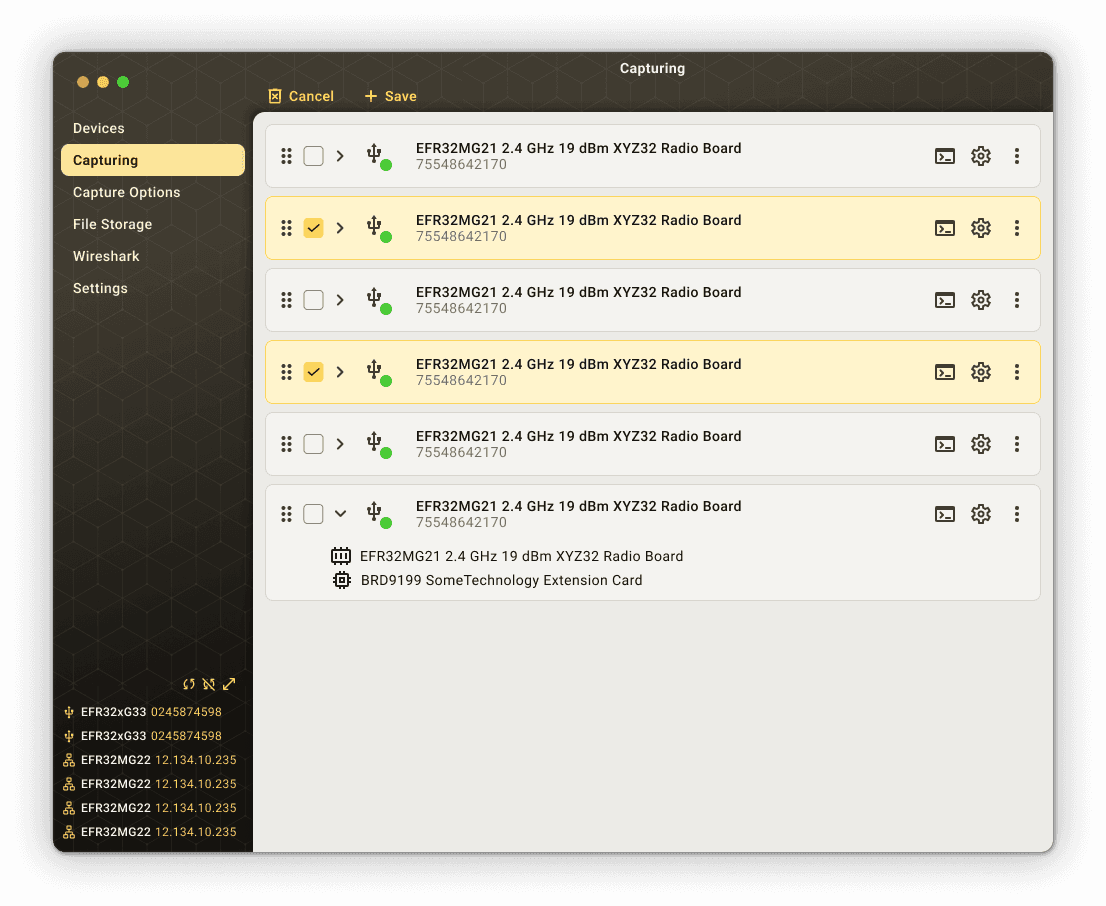
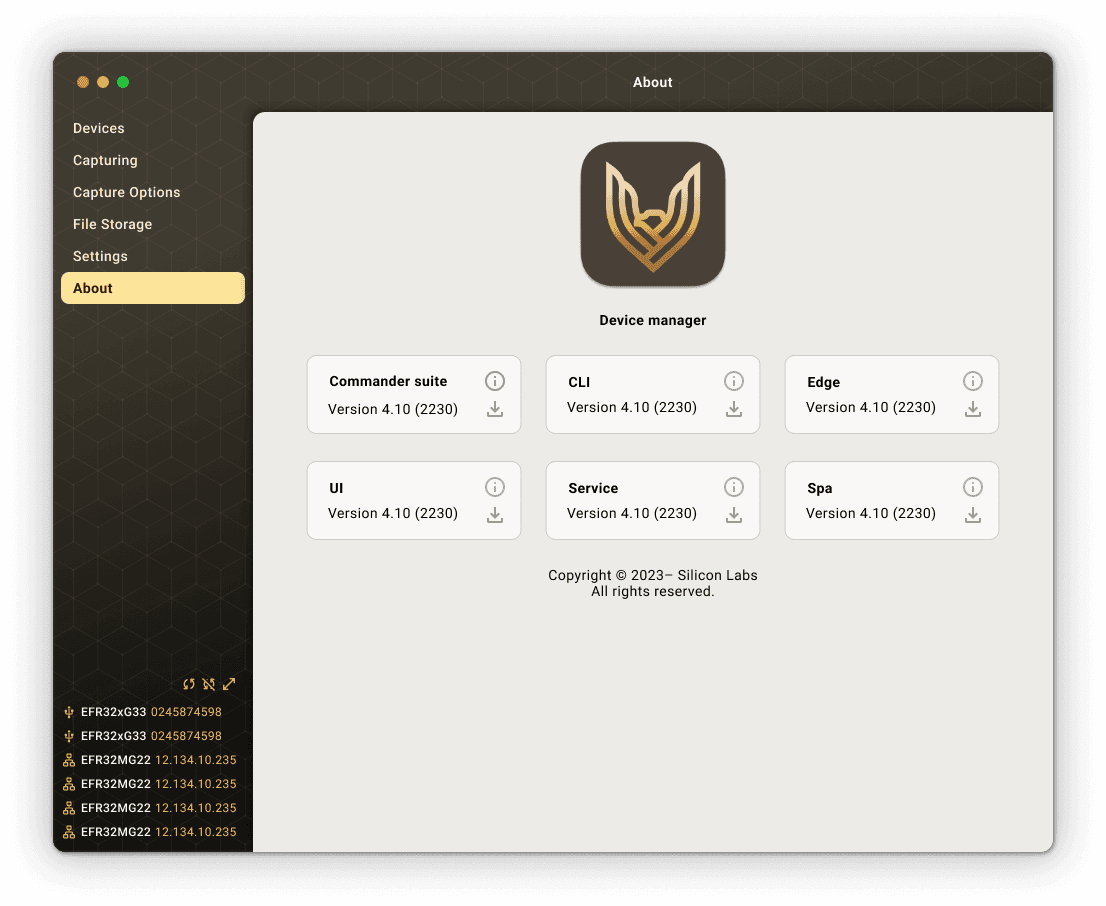
I joined the project after a Senior Software Engineer raised concerns about where SDM was headed. At the time, the team had been exploring an amber and gold visual direction that sat well off the Silicon Labs brand, and that was the concern that brought design in. So priority one was clear from the start: get SDM realigned with the Silicon Labs brand guidelines.
But it was obvious early on that the visual problems weren't the only ones. The tool had been put together incrementally without dedicated design involvement, and underneath the styling it carried usability problems the engineering team could feel without quite being able to name them. So the work split into two threads: realign the brand first, then dig into the UX properly through a structured audit.
Priority One: Brand Realignment
The first job was pulling SDM back onto the Silicon Labs brand. I moved it off the off-brand amber and gold and onto the direction the rest of the product family was using: a clean white content surface, a teal accent, and the Silicon Labs logo system. That gave the app a visual language with real precedent behind it instead of a one-off palette that didn't belong anywhere.
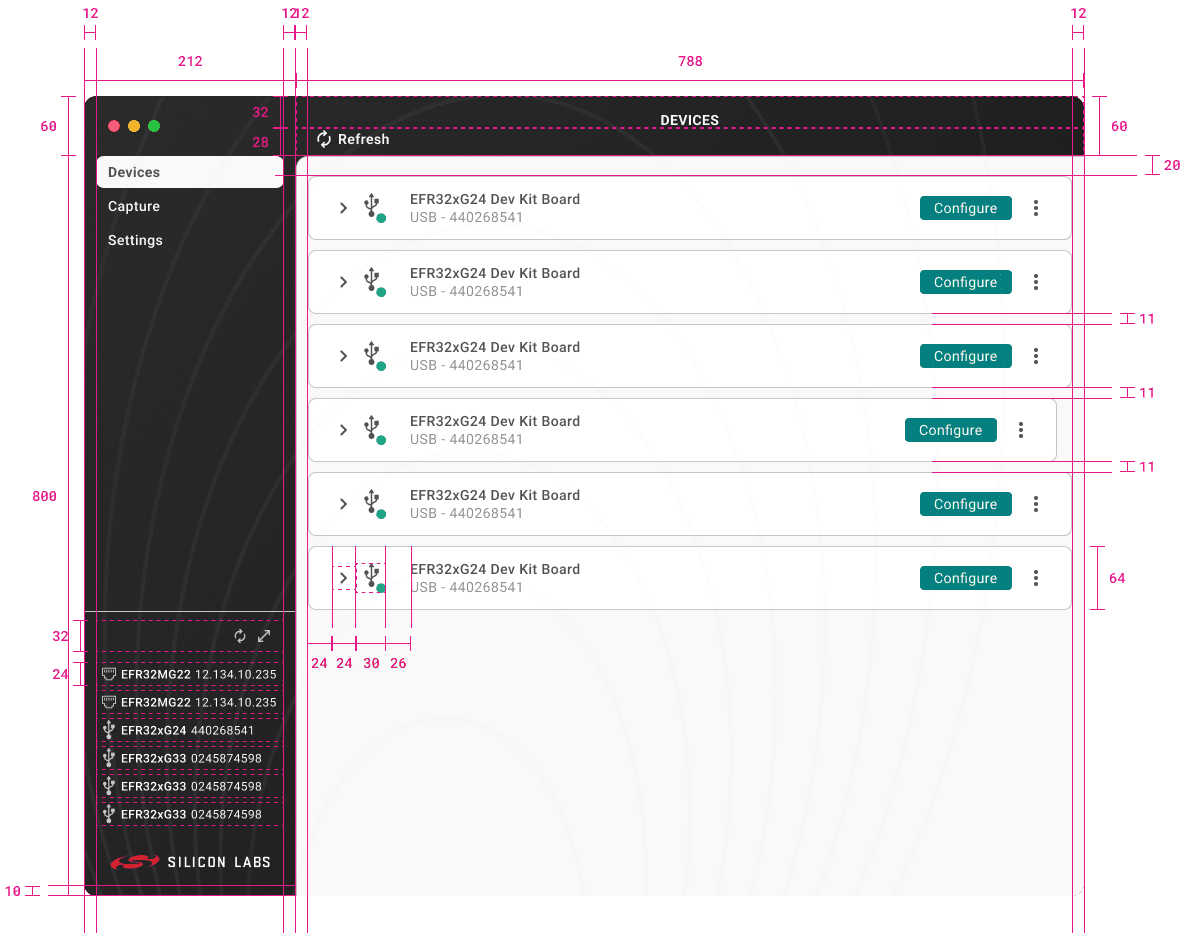
This rebranded build is the version everything downstream is based on. Once SDM looked like it belonged in the Simplicity Studio family again, I had a stable, on-brand foundation to evaluate the actual user experience against. I also produced engineering-ready redline specs for this light mode, with spacing values, component dimensions, and layout measurements for developer handoff.
The UX Audit
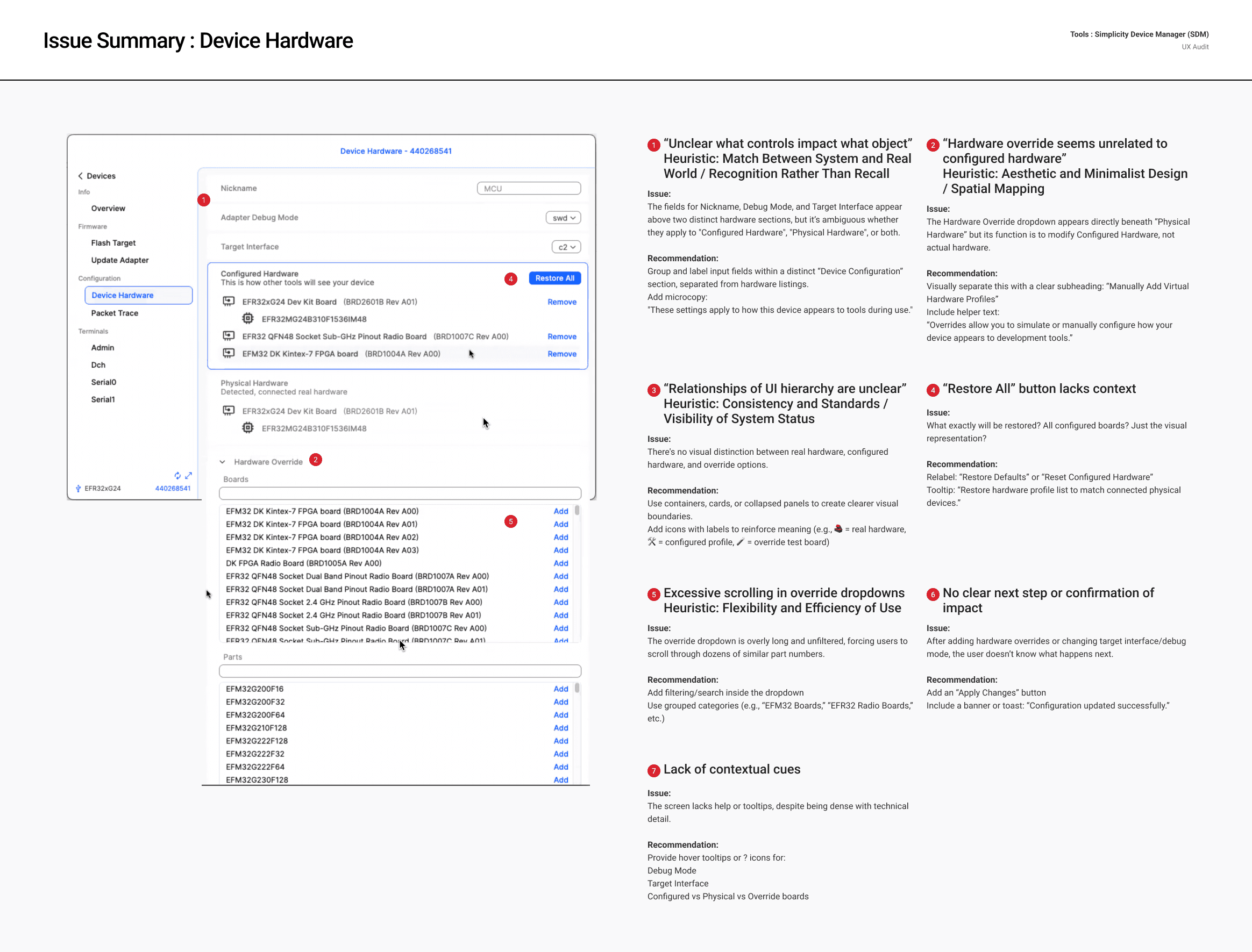
With the brand settled, I turned to the experience itself. Rather than redesigning from instinct, I ran a formal heuristic evaluation on the rebranded build. It was a screen-by-screen assessment mapped to Nielsen's 10 usability heuristics, with annotated screenshots, a description of each issue, and a specific recommendation for how to fix it.
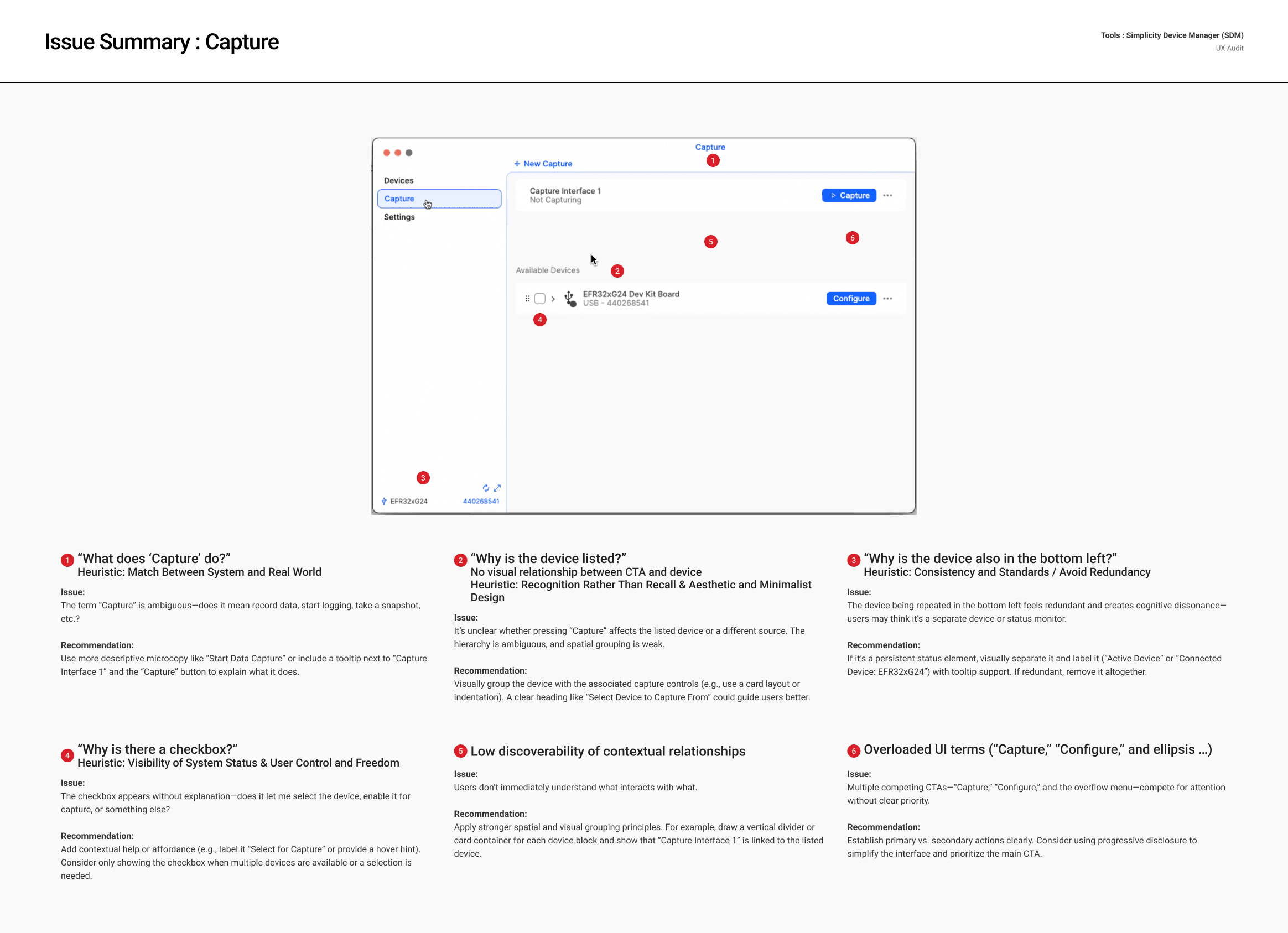
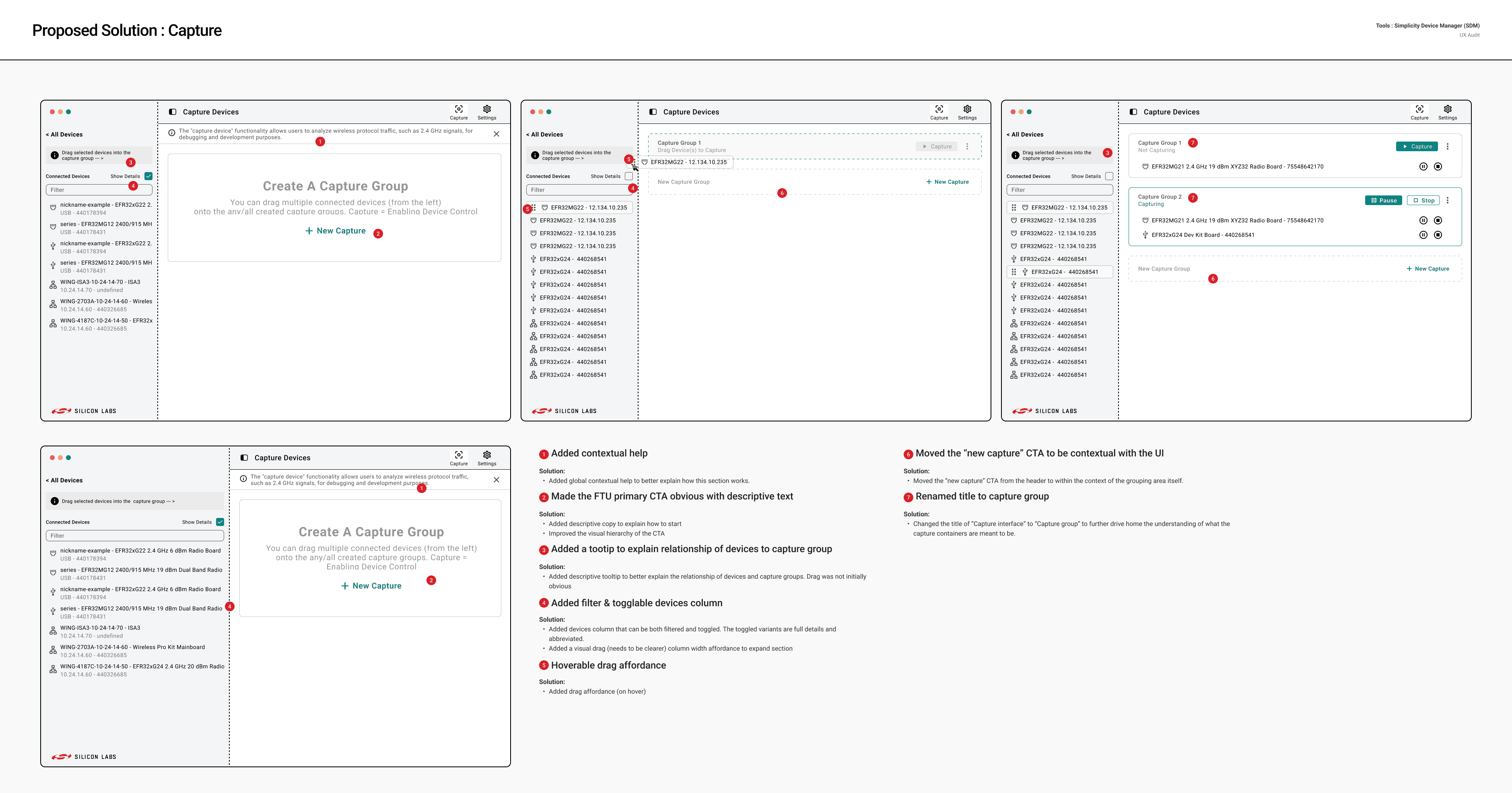
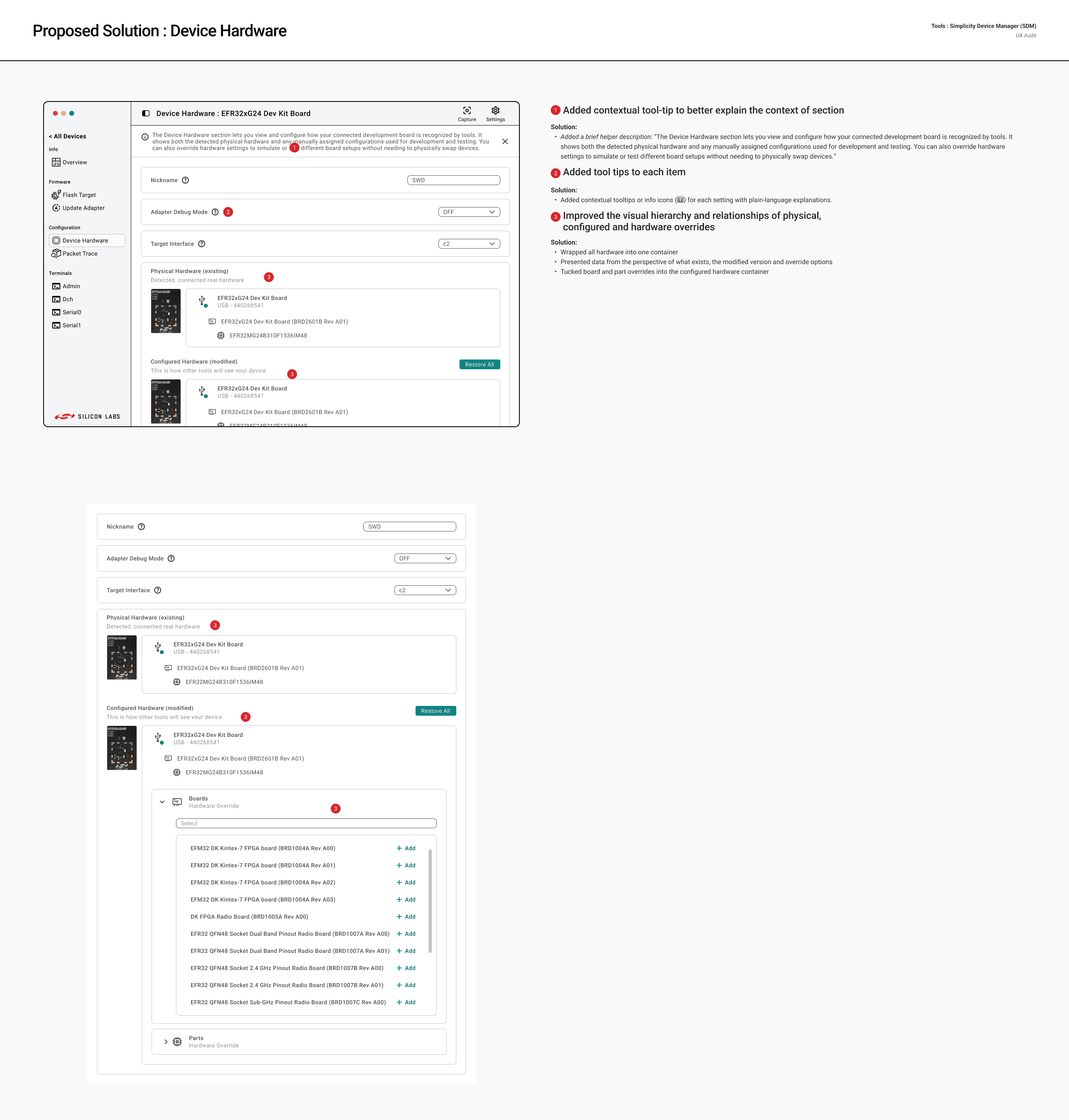
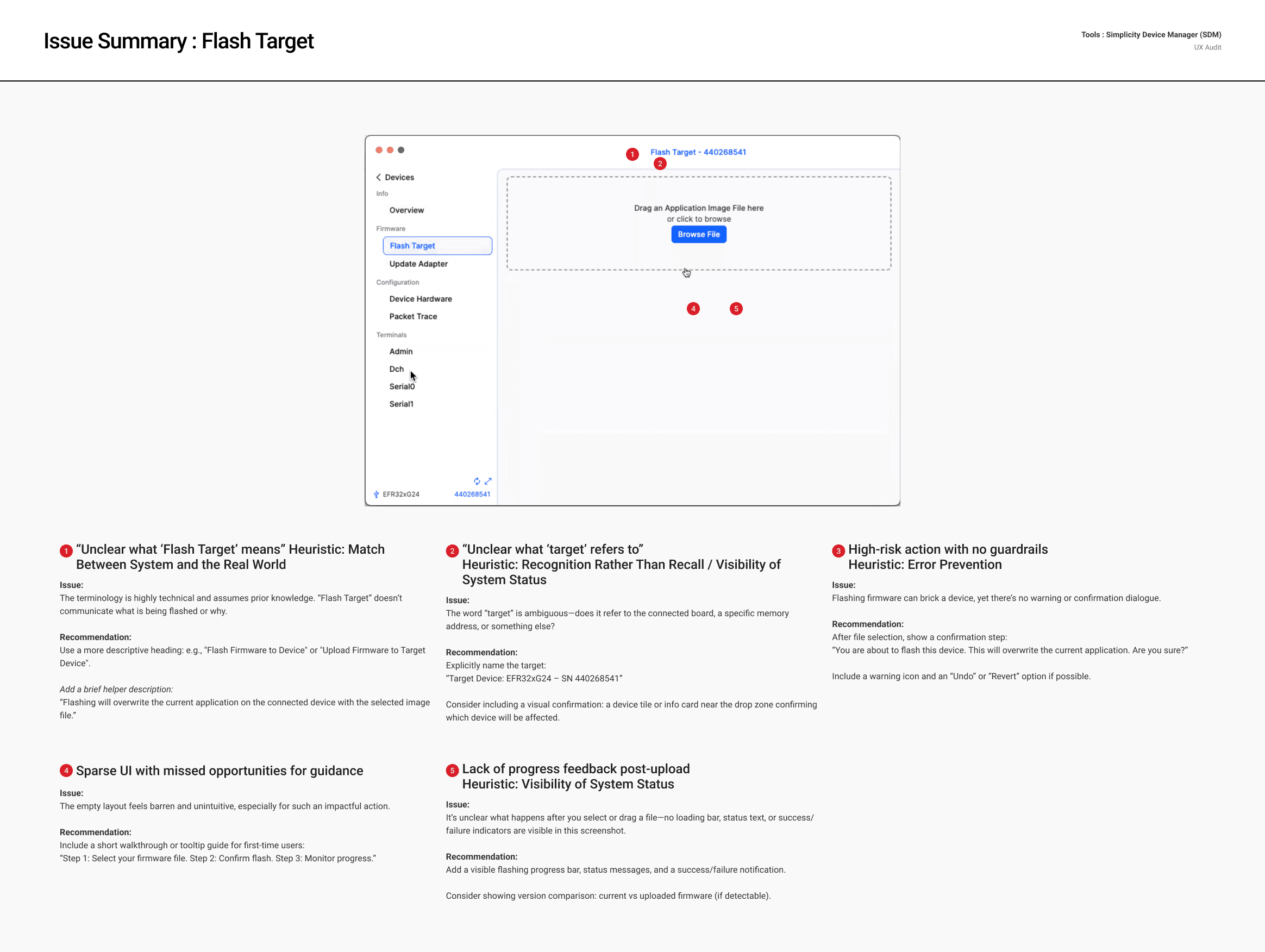
Every screen was documented as a pair: an "Issue Summary" page that called out the problems, and a "Proposed Solution" page that showed how each one could be resolved. This gave the engineering team a shared vocabulary for discussing and prioritizing the work, and it gave me a documented foundation before I changed any of the structure.
The audit covered every major screen: Devices, Capture, Device Overview, Flash Target, Update Adapter, Device Hardware, Packet Trace, the terminals (Admin, Dch, Serial0, Serial1), and Settings. The findings fell into three recurring buckets.
Clarity
Ambiguous language showed up everywhere.
"Capture" didn't tell you whether it meant record, log, or take a snapshot. "Flash Target" assumed knowledge the interface never gave you. "Update Adapter" didn't say what was being updated or why. "Hardware Override" appeared on the Device Hardware screen with no label explaining what overriding actually did or when you'd want to do it. Settings was a flat list of networking and discovery options, things like interval values, subnet configurations, and discovery keys, with no grouping, no tooltips, and nothing to tell you what would happen if you changed a value.
Capture was the clearest example. The word itself failed the "match between the system and the real world" heuristic, so my recommendation was to drop in more descriptive microcopy like "Start Data Capture," or at minimum a tooltip on the Capture button and the "Capture Interface" label spelling out what they do. On the same screen, the connected device was also listed again in the bottom-left corner. That redundancy created real cognitive dissonance, since users could reasonably read it as a second device or a separate status monitor. The recommendation was to either label it clearly as the active device with tooltip support, or remove it if it was truly redundant.
Hierarchy
Labels and values fought each other for attention all over the screens, everything rendered at similar weights with neither clearly winning.
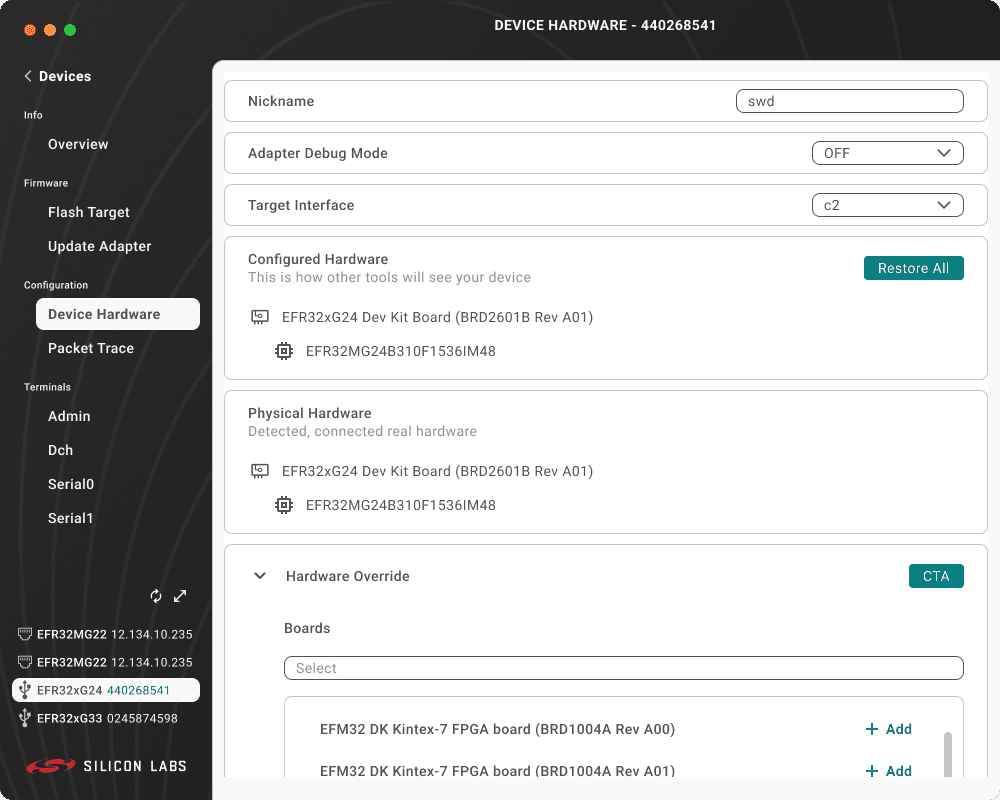
On Device Hardware, the three hardware layers (Configured, Physical, and Override) looked the same, with no containers or dividers to signal they were different things.
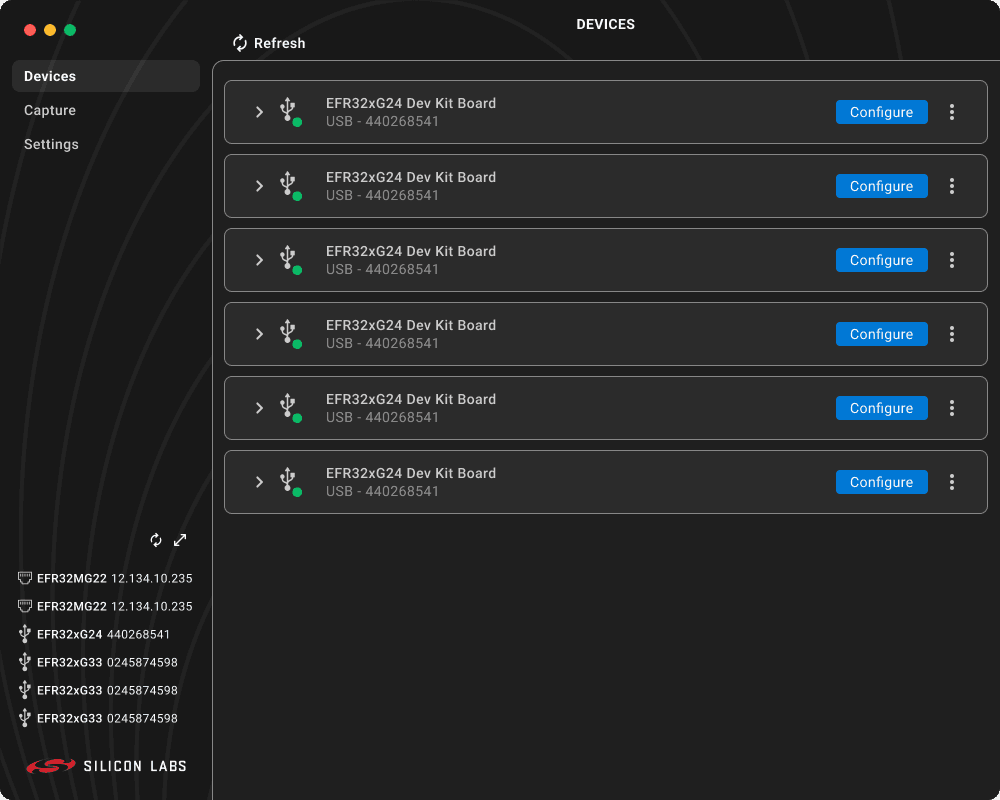
The top-level navigation barely changed between selected and unselected. On Capture, the layout never made clear which device a "Capture" action would actually affect. And on Devices, a "No Devices Found" message appeared in two places at once, while the refresh control was duplicated in both the top-left and bottom-left corners.
Device Hardware was the hardest screen to parse. There was no visual distinction between real hardware, configured hardware, and override options, even though those are three genuinely different concepts. My recommendation was to use containers and collapsed panels to draw clear boundaries, and to reinforce the meaning with labeled icons so each layer read as its own thing. The "Hardware Override" dropdown made it worse: it sat directly under "Physical Hardware" but its actual job was to modify Configured Hardware, so I flagged the need to separate it under its own subheading ("Manually Add Virtual Hardware Profiles") with helper text explaining that overrides let you simulate or manually configure how a device shows up to development tools. The "Restore All" button had the same vagueness problem, with nothing telling you what it would restore, so I recommended relabeling it to "Restore Defaults" with a tooltip clarifying scope.
Trust
The riskiest flows had the fewest guardrails.
Flash Target, where the wrong move can permanently brick a device, had no confirmation step, no progress feedback after you picked a file, and no indication of which device was about to be flashed. My recommendation was to add a confirmation step after device selection ("You are about to flash this device. This will overwrite the current application. Are you sure?") with a warning icon and an undo or revert option where possible, plus a visible progress bar and a clear success or failure state to replace the silence that followed an upload. I also flagged the ambiguity in the word "target" itself, since it could mean the board, a memory address, or something else, and recommended naming the target outright ("Target Device: EFR32xG24, SN 440268541") so there was no guessing about what would be affected.
Update Adapter had the same gaps. It showed a version number but gave no change log or compatibility context, no confirmation before a step that can't be undone, and no status afterward. The recommendation there was a summary card after upload showing the firmware name, version, and target device, followed by a confirmation dialog ("You are about to update adapter firmware. This action cannot be undone. Continue?"). These weren't edge cases. They were the core workflows the tool existed to support, which is exactly why the missing guardrails mattered so much.
The Redesign
With the audit as the brief, I moved into reworking the screens. The findings drove the structural and interaction changes, all of it built on the rebranded, on-brand foundation from the first phase.
Devices. I rebuilt the empty state with real first-action guidance ("Insert your device (USB | ETH) then select Refresh") in place of the blank canvas that told users nothing. The device count moved into the navigation label ("Devices (6)") so people could orient at a glance. The duplicated refresh control got consolidated to one spot, and the active tab finally read as active through weight and color. Settings and Capture moved up into the global navigation so they were easier to reach.
Capture. I renamed "Capture Interface" to "Capture Group" so the label actually said what the container was. Contextual help explained the drag-to-capture model, which had been completely invisible before. The device column became filterable and toggleable between full detail and an abbreviated view, with a hover-state drag affordance that made the interaction readable before anyone tried it. The "New Capture" CTA moved out of the header and into the grouping area, where its context made sense.
Flash Target and Update Adapter. Both got contextual help banners explaining, in plain language, what the operation did and what the risk was. The header now names the target device outright ("Flash Target: EFR32xG24 Dev Kit Board") so you always know what you're working on. And I added progress, status, and success/failure feedback to replace the silence that used to follow picking a file.
Device Hardware. I wrapped the three hardware layers into a single container and reorganized them to read as Physical (what exists), Configured (the modified version), and Override (the options), with the board and part overrides tucked into the configured-hardware container. Nickname, Adapter Debug Mode, and Target Interface each got a tooltip, since those settings used to assume expert knowledge.
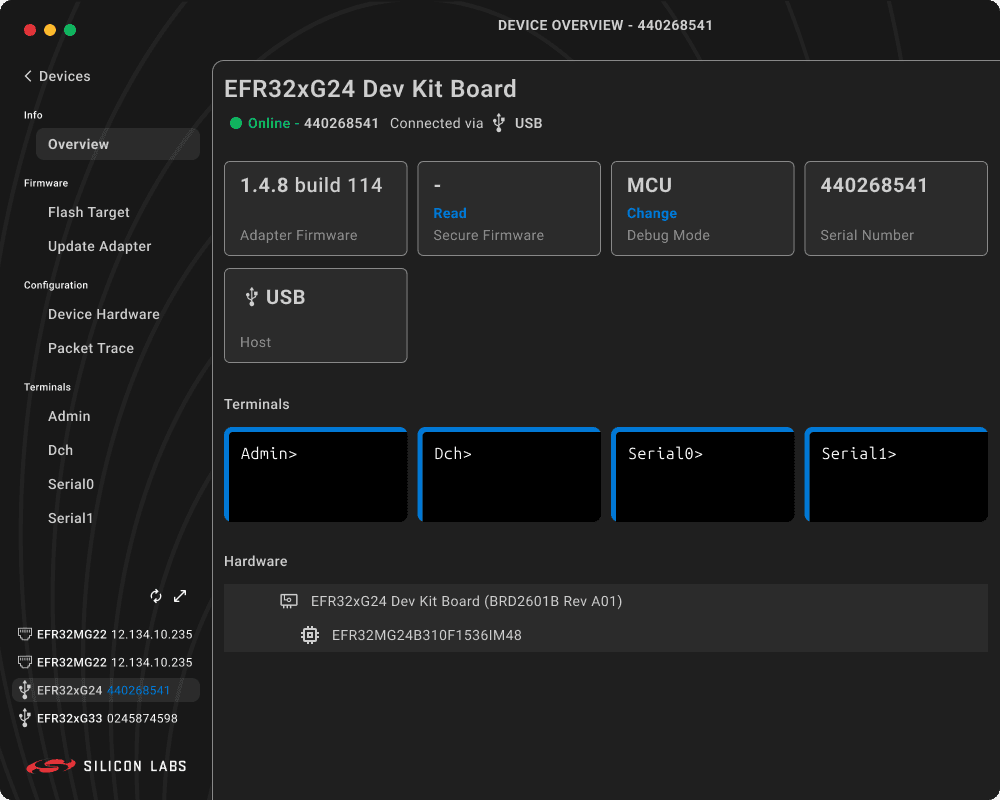
Overview. I styled "Change" and "Read" as real actionable elements instead of flat label text. The terminal tiles got button affordance: borders, hover states, and an "Open Terminal" label. I pulled the hardware section into the device-overview container to reinforce that it belonged to the device, and added a datagrid to surface board metadata that wasn't shown anywhere before.
Settings. I broke the flat list into a sub-navigated structure, with Discovery, Background Service, Appearance, and System Info each on their own page. That cut down the visual overload and left room to grow. Every setting got a tooltip. I added a consistent footer toolbar (Cancel / Save) to match the existing Studio controls, and surfaced system information as its own navigation item, since it used to be buried in an About screen with no clear way to reach it.
Dark Mode Strategy
With the light mode settled and the UX reworked, dark mode became its own conversation rather than an afterthought. The original product had treated light and dark as the same flat layout on different backgrounds. This time we worked through it on purpose: how the system should translate, which accent carried into the darker surface, and how to hold legibility and hierarchy across both modes. The Appearance section got a proper Light / Dark / System control to support it.
We landed on a dark theme with a blue accent for primary actions. It gave dark mode a considered treatment of its own while keeping every structural and interaction improvement from the light-mode work intact.
Deliverables
On-brand realignment to the Silicon Labs brand guidelines (white / teal light mode)
Engineering redline specs for the light mode (spacing, sizing, layout)
Screen-by-screen heuristic audit with paired "Issue Summary" and "Proposed Solution" pages
UX redesign across every major screen
Dark-mode strategy and treatment (blue accent)
Impact
I presented the brand realignment, the audit, and the redesign to the broader product and engineering team. The work resolved the off-brand concern that had brought design in, backed up the deeper usability worries the Senior Engineer had raised, gave the team a documented and prioritized problem set to work from, and set a clear direction for SDM going forward, both in how it behaves and in how it lines up with the Silicon Labs brand and the rest of the Simplicity Studio family.
Reflection
Coming into a product that already exists and already has users is its own kind of challenge. The question isn't whether it works, because it mostly does. The question is whether it works well enough that its rough edges aren't quietly costing people time, confidence, or trust in their tools.
Fixing the brand first was the right call, and not only because it was the stated priority. Getting SDM back on brand gave me a clean, trustworthy foundation to evaluate the experience against, so the audit could focus on how the product actually behaved instead of getting tangled up in how it looked.
The audit itself made the case in terms the engineering team could engage with. Not aesthetic opinions, but specific heuristic violations tied to specific moments in the product. That framing moved the conversation from "this feels off" to "here's what's broken and here's how we fix it," which is the only version of that conversation that goes anywhere. By the time dark mode came up, it was a deliberate decision built on settled ground rather than a default bolted on at the end.